
August 2, 2026 · RSVP
Branded RSVP Page: Why Your Brand Matters
Wedding, graduation and corporate invitations have moved to the screen: almost nobody sends a printed card anymore without a digital version alongside it, and more and more often the RSVP lives on a page of its own. For an event company, that page is easy to overlook. It shouldn’t be. Every guest at every event you run lands on it, and whose name is at the top says a lot about who is running the show.
What a branded RSVP page is
It’s the page guests open to reply to the invitation, made for that specific event and carrying your company’s logo and colors (not the logo of the software behind it). Guests reach it from the invitation email, from the couple’s or the client’s website, or by scanning a QR code printed on the invitation. They reply on the spot, with no app to install and no account to create.
It isn’t the same as a generic form. A standalone online form doesn’t know who is answering, doesn’t stop duplicates, doesn’t enforce a plus-one limit and doesn’t feed a live guest list. A branded RSVP page does all that and looks like part of your service.
What guests see on the page
- Your brand: logo and colors of your company, in one of several themes and layouts you preview live while setting it up.
- The event: date, time, venue with directions on the map, a countdown and up to eight photos.
- One-tap reply: Going, Not going or Maybe, plus the number of plus-ones within the limit you set for that guest, and the questions you added (dietary restrictions, arrival time, and so on).
- After they confirm: a confirmation screen and, once you’ve seated them, their table number, a small map of the room and the QR code they’ll show at the door.
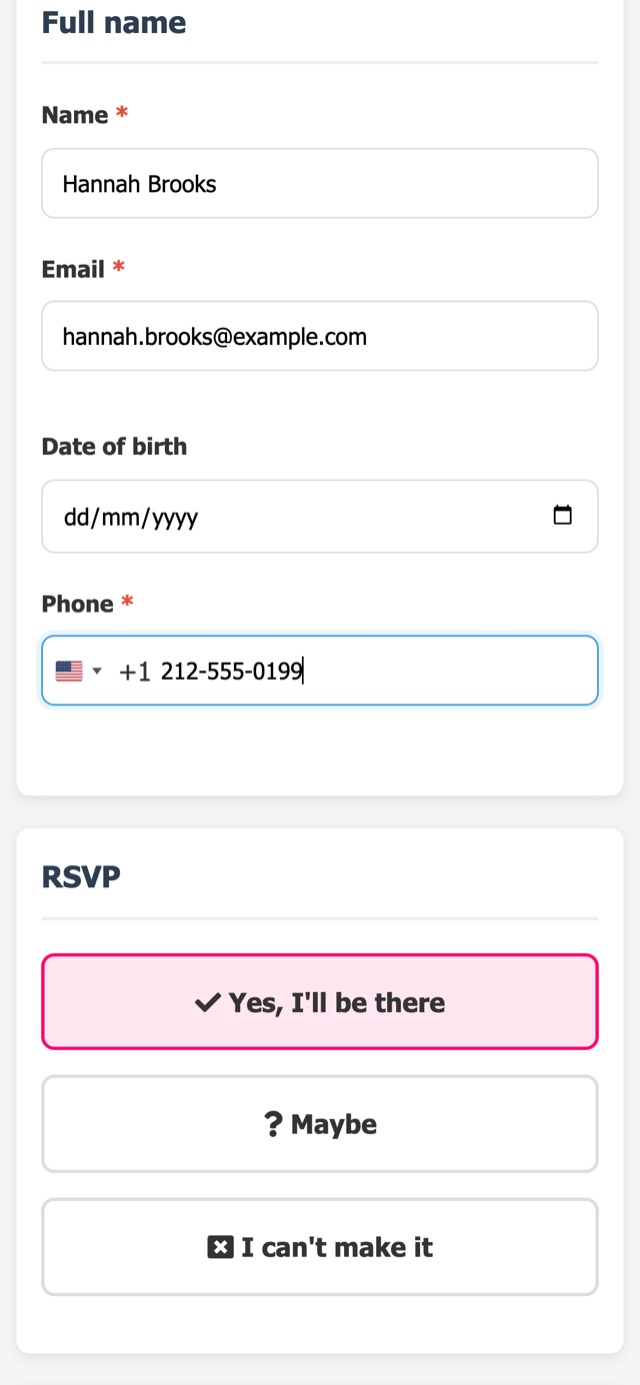
Why your brand matters more than the software’s
- The guest list is your next client list. Today’s guests include the next couple, the next family planning a quinceañera, the next HR manager booking a holiday party. A page with your name puts your company in front of them; a page with someone else’s name doesn’t.
- Consistency with what you sold. Your proposal, your contract and your day-of team carry your brand. The RSVP is the first part of the event most guests touch, and it should look like the same service.
- Trust. Guests reply more comfortably to a page that clearly belongs to the planner, venue or agency running the event than to an unfamiliar brand they’ve never heard of.
- Your client sees it too. When the couple or the company shares the page, they’re sharing your work. Pair it with the host page, where they follow replies and add guests on their own.
Where to share the page
One page, many entry points. Send it in the invitation email, add it to the couple’s wedding website or the client’s event page, print it as a QR code on the paper invitation or the save-the-date, or hand the link to your client so they can pass it on in their own messages. Every reply, wherever it came from, lands on the same dashboard. For the step-by-step of setting it up per client event, see how to create an RSVP link for each event.
What a good branded RSVP page needs
- Work on any phone, in the browser, with nothing to install.
- Your logo and colors, set once and reused on every event, with room to match each event’s look.
- A plus-one limit per guest, so the headcount doesn’t grow on its own.
- The questions your operation needs, each required or optional.
- A live dashboard behind it: going, not going, maybe and pending, with automatic reminders for the pending ones.
- A path to the door: table number and QR code for check-in on the day.
If you’re deciding between one page per event and a full event website, see when a dedicated RSVP website makes sense. And for the invitation itself, read branded digital invitations.
Branded RSVP pages for each type of event company
- Wedding and event planners: one page per wedding, with your name on every one of them. See more in solutions for wedding and event planners.
- Event venues and caterers: your venue’s brand in front of every guest, and a live headcount for the kitchen. See more in solutions for event venues and caterers.
- Corporate event agencies: a page in your agency’s colors (or matched to your client’s event), sent by email to the whole list. See more in solutions for corporate events.
How to set up your branded RSVP page
In RSVPito, you set your logo and colors once, pick a theme for each event and see the page update live before sending. The page comes with the dashboard, automatic reminders, the floor plan and QR code check-in in the same account, with unlimited events.
Talk to us and see how your brand would look on the RSVP page of your next event.