
Every guest, confirmed. For every event you run.
Send branded invitations by email, link or WhatsApp, watch RSVPs come in live, seat every guest and check them in by QR code. Built for planners, venues, caterers and corporate event agencies.
- One-tap RSVP, no app, no account
- Automatic email reminders to pending guests
- Your brand on every guest page
Built for companies that run events professionally
- Wedding & Event Planners
- Event Venues
- Caterers
- Corporate Event Agencies
- Event Spaces
- Live Music Venues
Everything You Need to Track Attendance
Real-Time RSVPs
Protected, Secure Data
Every Event, Organized
Simple Technology for a Real Event Problem
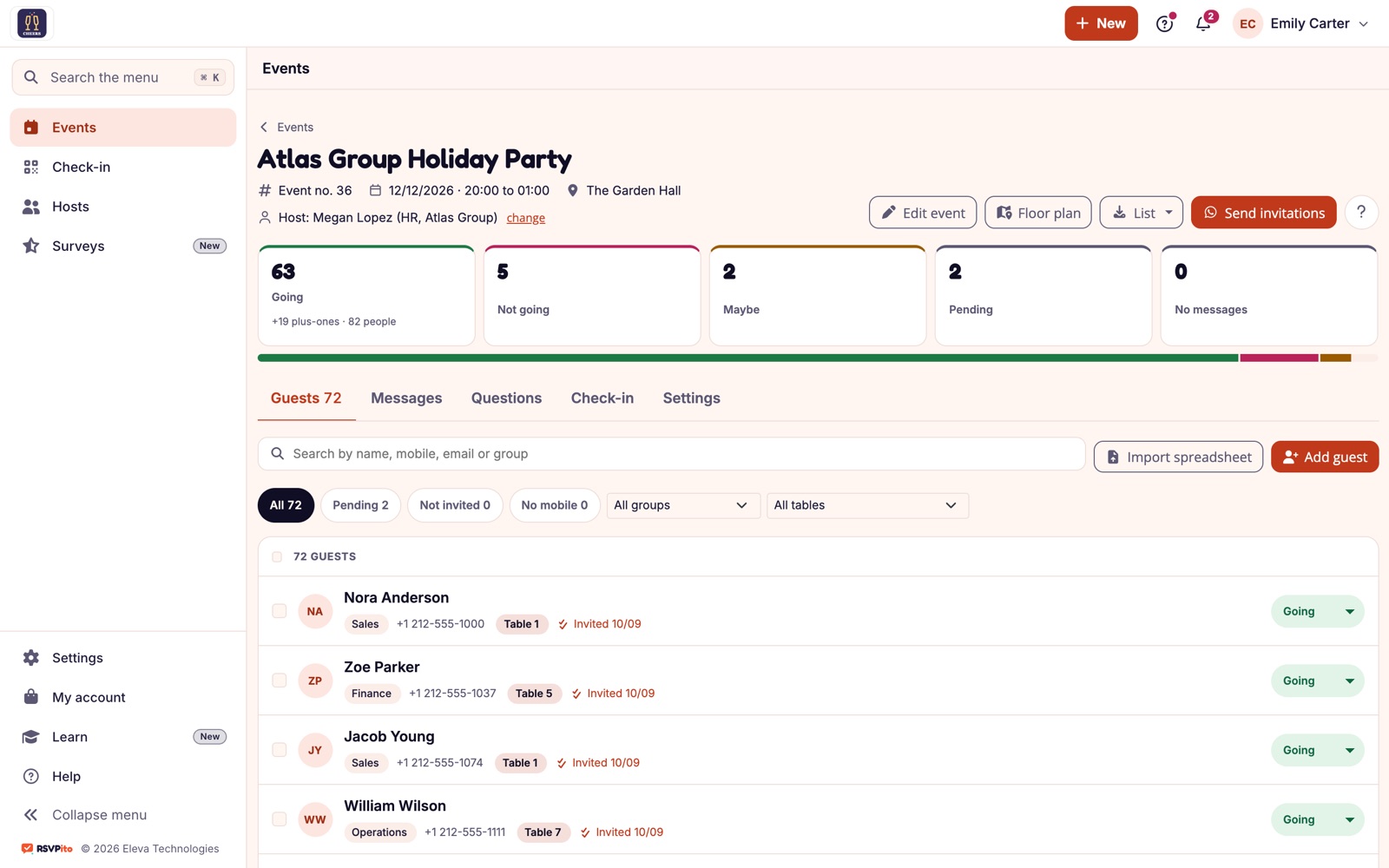
RSVPito was built to end the guesswork of not knowing how many guests will actually show up. Planners, venues, caterers and corporate event agencies send branded invitations by email and link, let the reminder schedule chase pending replies, arrange the tables and check guests in from a phone, all in one real-time dashboard.
Built for Event Companies, Without the Hassle
Frictionless RSVPs
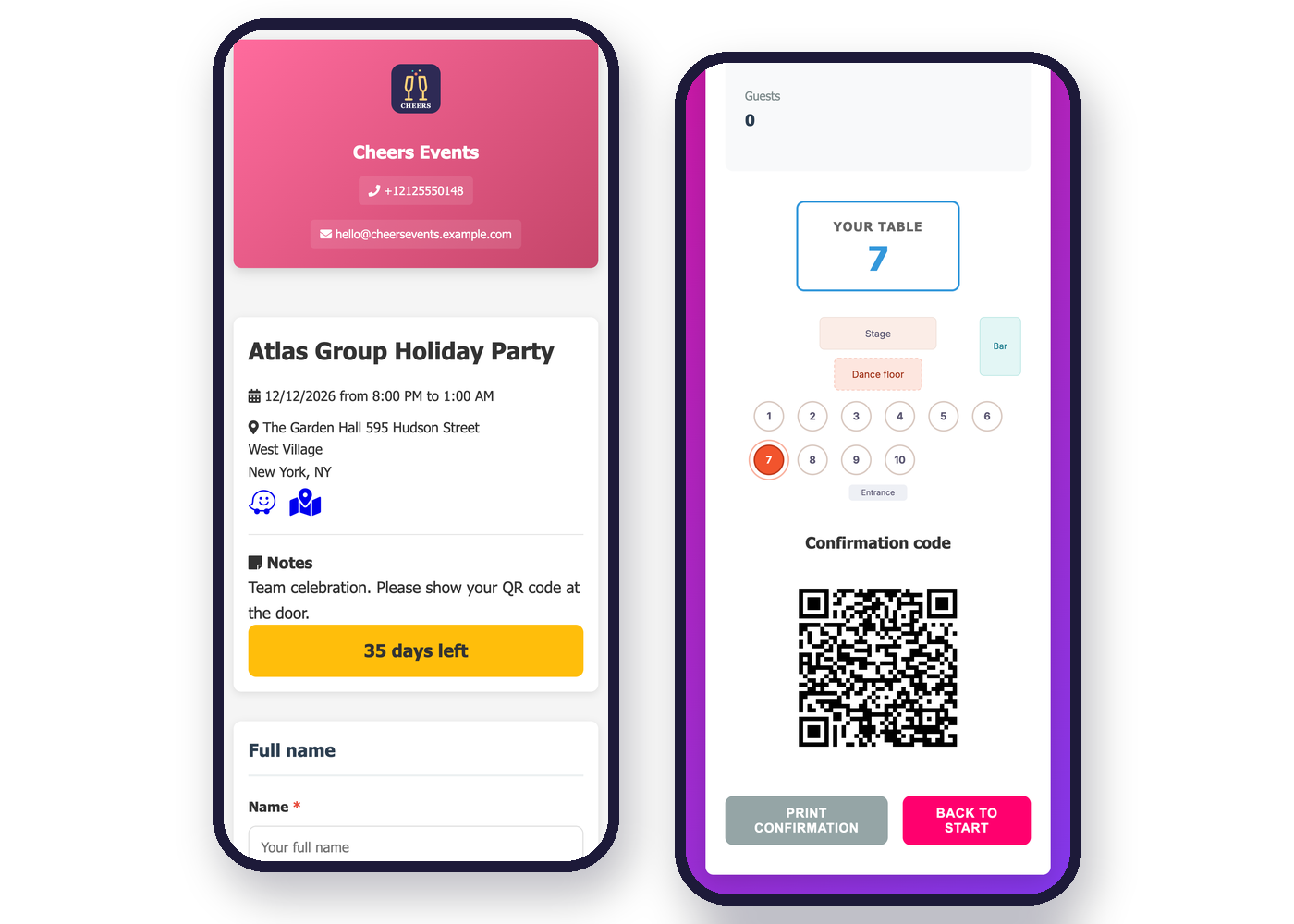
The invitation arrives by email or as a link to your branded guest page, with the event artwork. Guests reply with one tap, without installing anything or creating an account.
One-Tap RSVP by Email or Link
Guest Page With Your Brand
Real-Time Dashboard
Going, not going, maybe and pending on a single dashboard, updated with every reply, with the latest answers on your home screen. Filter by group, table or answer, resend to pending guests in one click and export the list as a PDF for the door or as an Excel file.
Manage Multiple Events
Team With Access Profiles
From Invitation to After the Event, in One Platform
Invite
Follow
Reminders Go Out on Their Own
Every Guest Knows Their Table
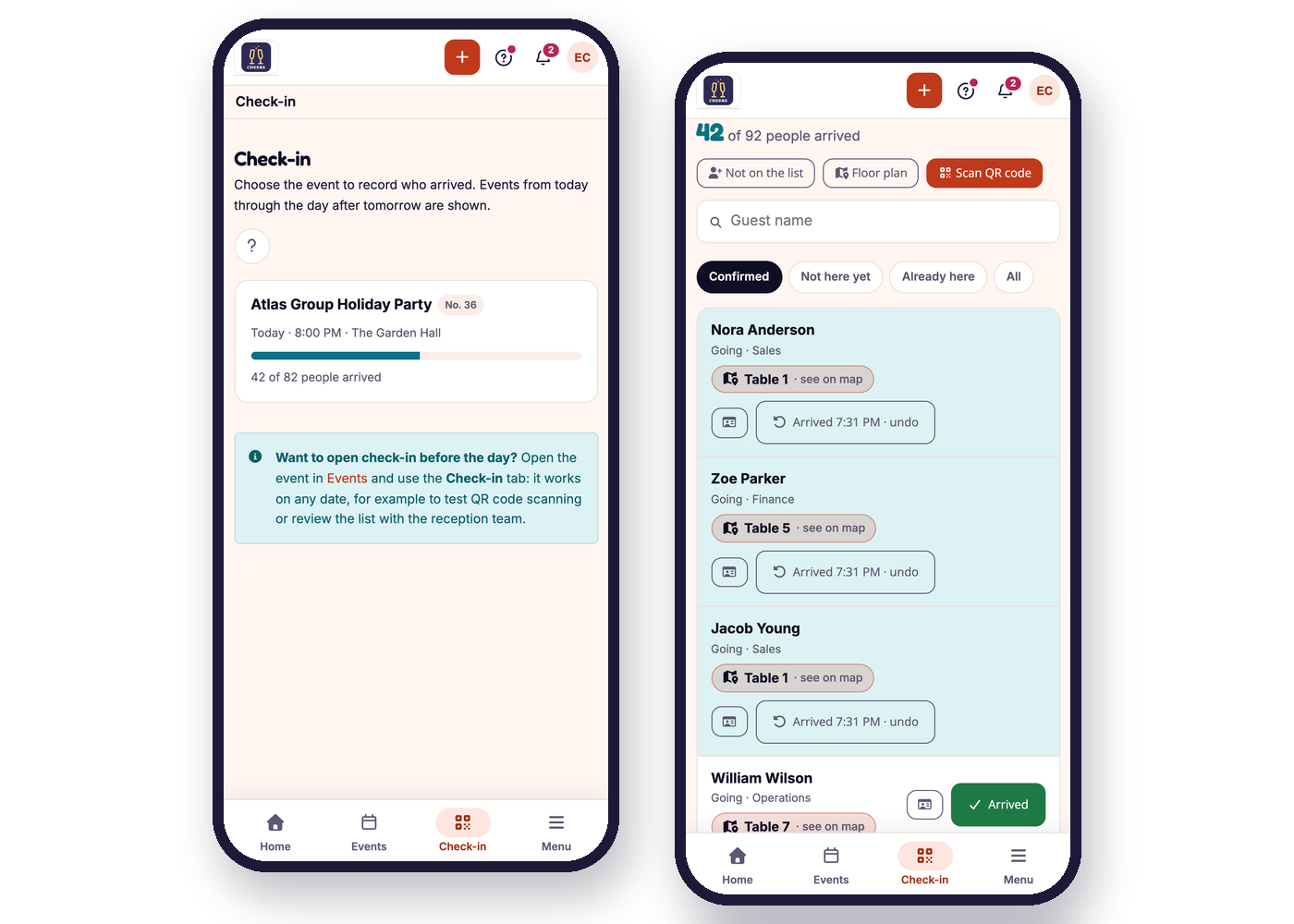
Welcome, With No Line
Then, Feedback From Those Who Came
One Platform for Your Entire Event Operation
Whether you’re a wedding or event planner, a venue, a caterer, an event space or a corporate event agency, RSVPito brings the RSVPs for all your events together, with your team in Administration, Operations and Reception profiles.
From Invitation to the Door, No Loose Ends
Questions for Guests
Invitation With the Event Artwork
Entry Form
Guests Not on the List
Host Page
Alerts in the Browser and on Your Phone
One-Tap RSVP by Email or Link: No App, No Account
Guests don’t download an app, create an account or remember a password. The invitation arrives by email, or as a link you share any way you like (even as a QR code on the printed invitation), and they reply with one tap on a page with your company’s brand. Guests abroad? Send the invitation on WhatsApp too.
Why it works: replying takes a single tap, on any phone or computer, and every answer lands on your dashboard right away.
How fast guests reply depends on each event and each audience.
Plans Based on Your Guest Volume
You pay for the primary guests you add each month, not per event. Plus-ones don’t count, events are unlimited, and invitations, resends and reminders are included. Email is always free.
- Plus-ones don't count
- Unlimited events
- Reminders included
- Email always free
Up to 100 guests/month
100 primary guests added per month. Plus-ones don't count.
- Unlimited events
- Email invitations with one-tap RSVP
- Automatic resends and reminders
- Guest page with your brand
- Host page
- Floor plan and seating
- QR code check-in
- Questions for guests
- Team with access profiles
Up to 250 guests/month
250 primary guests added per month. Plus-ones don't count.
- Unlimited events
- Email invitations with one-tap RSVP
- Automatic resends and reminders
- Guest page with your brand
- Host page
- Floor plan and seating
- QR code check-in
- Questions for guests
- Team with access profiles
Up to 500 guests/month
500 primary guests added per month. Plus-ones don't count.
- Unlimited events
- Email invitations with one-tap RSVP
- Automatic resends and reminders
- Guest page with your brand
- Host page
- Floor plan and seating
- QR code check-in
- Questions for guests
- Team with access profiles
- Plans are based on primary guests added per month: a family of four counts as one guest.
- Every plan includes the same features. Talk to us for pricing.
- More than 500 primary guests a month? Talk to us.
Designed for Companies That Run Events Professionally

Frequently Asked Questions
1. What is RSVPito?
RSVP and guest management software for event companies: send invitations by email and link, follow RSVPs in real time, arrange the tables and run reception from a phone.
2. How do guests RSVP?
With one tap on Going, Not going or Maybe, from the invitation email or on your branded guest page. No app to install and no account to create.
3. Are messages included?
Invitations, resends, reminders and guest questions are included in the plan, and email is always free. If you also invite on WhatsApp, only free-form general announcements there are sold separately, in packs.
4. Can guests bring plus-ones?
Yes. You set how many plus-ones each guest can bring, per event or guest by guest, and the dashboard always shows the total headcount, plus-ones included.
5. How are plans priced?
By the number of primary guests you add each month, in tiers of 100, 250 and 500 (above 500, we build a custom plan). Plus-ones don't count and events are unlimited. Talk to us for pricing.
6. Can I also invite guests on WhatsApp?
Yes, as an option. It's useful for guests abroad, destination events and guests who prefer WhatsApp: they get the invitation with Going, Not going and Maybe buttons. Email and the guest page are always available.
7. Can I manage several events?
Yes, all your events in one account, each with its own guest list, reminder schedule and floor plan.
8. Can my team use it?
Yes, with profiles: Administration, Operations and Reception (which only sees check-in).
9. Can my client (the couple, HR) follow along?
Yes, on the host page, with an access code. They follow the RSVPs, add guests and upload the artwork and photos.
10. Does it handle seating?
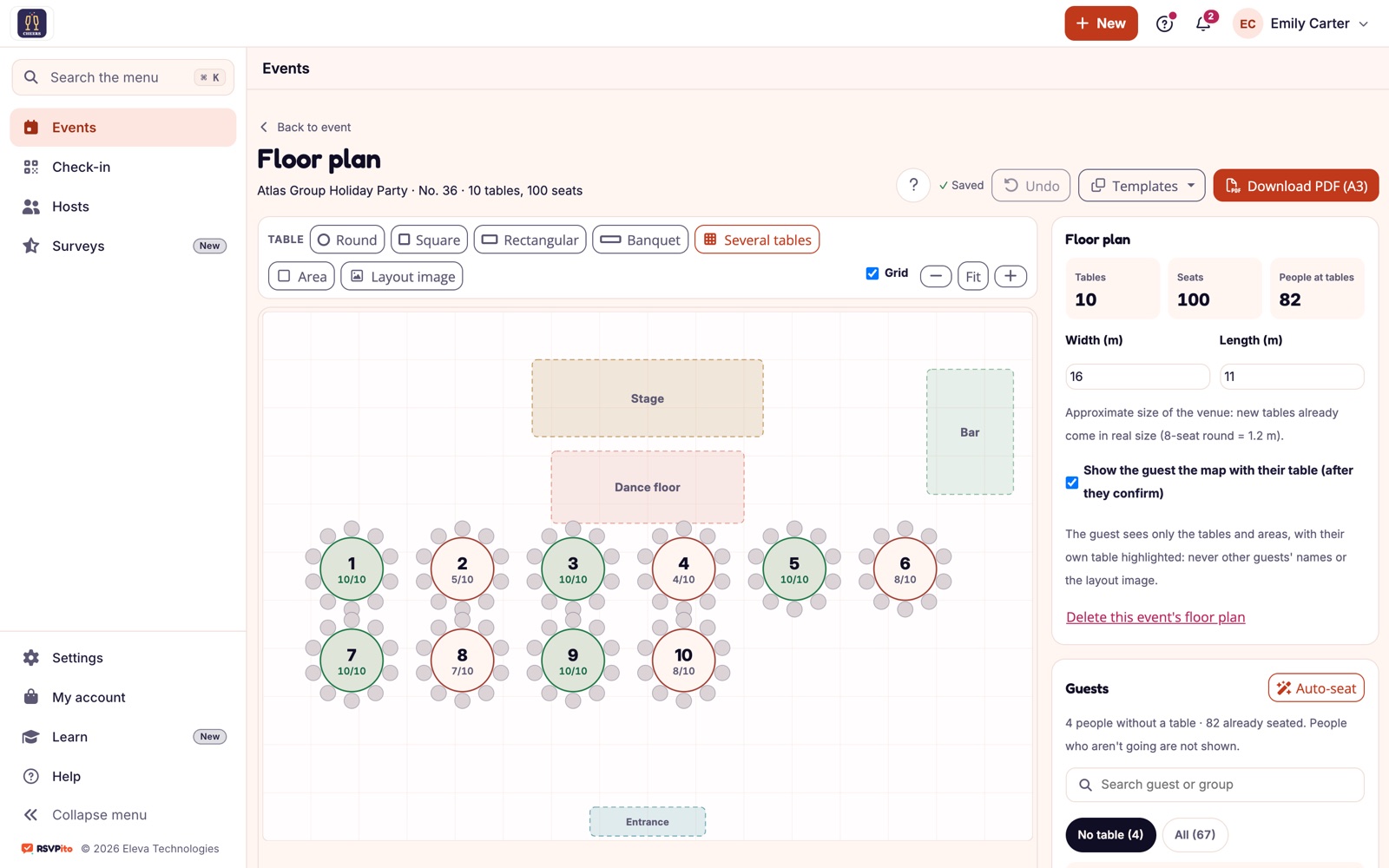
Yes. You draw the room, seat the guests (even automatically, without splitting families and groups) and each guest sees their table. The floor plan sets the table, not the seat.
11. How does check-in work?
From a phone, by scanning the QR code or searching by name. You choose what reception asks for at the door and can allow walk-ins who weren't on the list to be registered. Check-in requires an internet connection.
12. Can I collect dietary restrictions?
Yes, with questions for guests: each person answers when they confirm, and you get a summary ready for the caterer.
13. How is guest data handled under data protection laws (like LGPD in Brazil and GDPR in Europe)?
Consent is recorded, every message includes an opt-out option, and sensitive answers are protected and deleted 90 days after the event.
14. Can I use it for a personal event?
RSVPito is for companies that run events frequently. There's no one-off plan for a single personal event: if you're throwing a party, ask your event planner or venue whether they use RSVPito.
15. How do I get started?
Talk to us. We'll show you the platform, help set up your account and get your first event running.
Stop chasing RSVPs. Start with RSVPito.
Set up your first event in minutes and watch the replies come in. Talk to us to see RSVPito working with events like yours.